

Please note: This website contains affiliate links. As an Amazon Associate, we earn from qualifying purchases at no additional cost to you. Learn more.
Potential clients are Googling you before they call. This guide shows you how to look at the first page of your Google results through a client’s eyes, spot anything outdated, incomplete or unprofessional, and clean up the profiles and information they’re most likely to see. The goal is simple: make sure your first page of Google helps you look credible, current and worth contacting.
Agents… have you googled yourself lately?
Here’s a scenario almost every real estate agent can relate to….
You’re at a neighborhood party and meet someone you really hit it off with. Even better, they mention they’re thinking about moving in the next few months. You have a great conversation, hand them your card and leave thinking, That could turn into something.
But they never call.
There could be a hundred reasons why, of course. But there’s a pretty good chance they did something before they ever considered picking up the phone:
They Googled you.
Because that’s what we do now. If a friend gives us the name of an amazing contractor, we Google them. If someone recommends a financial advisor, we Google them. We want to see who they are, what other people say about them and whether they look like someone we’d trust.
And choosing a real estate agent is no different.
Potential clients may hear your name at a party, see it on a listing sign, meet you at an open house or get it from a friend. But before they contact you, they’re likely to do a little investigating of their own.
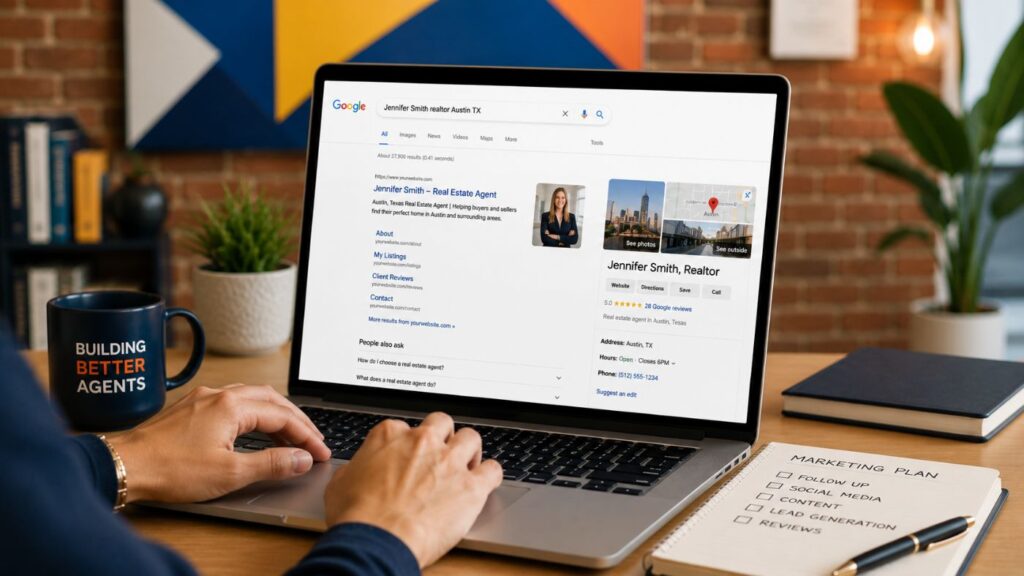
So here’s the question: When someone Googles your name, does what they find make them more likely to call you — or less?
That’s what we’re going to find out.
In This Guide: Your Real Estate Agent Google Audit
We’re going to look at your Google results the way a potential buyer or seller might — not as an SEO expert obsessing over rankings, but as someone trying to decide whether they want to work with you.
- Google yourself like a potential client would — See exactly what someone researching you is likely to find.
- Look at your results through their eyes — Determine whether you look credible, current and knowledgeable about your market.
- Let Google build your to-do list — Focus on the profiles people are actually finding rather than trying to fix everything on the internet.
- Knock out the easy wins — Update Realtor.com, Zillow, your brokerage profile and other prominent results.
- Check your reviews and local expertise — Make sure potential clients can find reasons to trust you.
- See what AI knows about you — Take the same basic audit beyond traditional Google search.
And before you start mentally adding all of this to your marketing to-do list, don’t.
For many agents, the basic cleanup we’re about to do can probably be handled in an hour or two. Then the heavy lifting is done.
Your Fast-Track Cleanup List
- Google your name + “Realtor” and + “real estate agent”
- Claim or complete your Realtor.com profile
- Update your Zillow agent profile
- Fix your brokerage page (photo, bio, contact info)
- Refresh LinkedIn and your business social profiles
- Check your own website — if you have one
- Add a Google Business Profile (good next project)
Full walkthrough below. Most of this takes an hour, maybe two.
First, Google Yourself Like a Potential Client Would
Before we fix anything, we need to know what we’re working with.
Open a private or incognito browser window so your previous search activity has less influence on what you see. Then try a few searches:
- Your full name
- Your name + Realtor
- Your name + real estate agent
- Your name + your city
- Your name + Realtor + your city
- Your name + your brokerage
If you have a common name, adding your city or “real estate” becomes especially important. Jennifer Smith the Realtor in Chicago probably doesn’t need to spend too much time worrying about outranking Jennifer Smith the dentist in Phoenix.
Now look at the entire first page of results, not just whether your website appears. Check the regular search results, images, videos, review profiles and anything else Google displays.
And for the first few minutes, don’t fix anything.
Just look. Pretend you know absolutely nothing about yourself except that someone at a neighborhood party told you, “She’s a great real estate agent. You should call her.”
What impression would you get?
What Is a Potential Client Actually Looking For?
Most people probably aren’t conducting an exhaustive background investigation before calling a Realtor. They’re doing a quick credibility check.
In a surprisingly short amount of time, they’re trying to answer a handful of questions:
| What they’re wondering | What they hope to find |
|---|---|
| Is this person legitimate? | Current brokerage information and credible real estate profiles |
| Do they know my area? | Local content, listings, neighborhood expertise and market information |
| Do they seem experienced? | A good bio, useful information and evidence of current real estate activity |
| Do other people trust them? | Recent reviews, recommendations and testimonials |
| Would I feel comfortable working with them? | Photos, video, social profiles and enough personality to get a sense of who they are |
| Are they actually active right now? | Current contact information, recent activity and updated profiles |
They’re probably not counting how many awards you’ve won or analyzing whether you have 4,000 Instagram followers.
They’re trying to decide:
Does this person look knowledgeable, trustworthy, current and like someone I’d want helping me buy or sell a house?
That’s what we’re trying to improve.
Let Google Build Your To-Do List
This is where we’re going to make the process much easier. You do not need to create profiles on 25 websites, redesign your brand, build a new website and start posting daily on six social networks. Instead, let Google tell you where to start.
Search: Your Name + Realtor and Your Name + Real Estate Agent
Then write down the first five or six relevant results. That’s your priority list.
If Realtor.com is first, start there. If Zillow is next, that’s number two. If your brokerage profile is third and has the headshot you stopped using seven years ago, we’ve found number three. Fix what potential clients are actually seeing before worrying about everything they might someday see.
And here’s the best part: this isn’t another marketing strategy you’re signing up to maintain for five hours every week.
For many agents, you can knock out most of the basic cleanup in an hour or two. Claim a couple of profiles, upload your current headshot, update your bio and brokerage information, fix anything obviously outdated and you’re done with the heavy lifting.
You can improve things over time, of course. But this isn’t supposed to become another giant project on your marketing to-do list.
Fix the most visible things first, get them working for you and move on.
#1 | Start With Realtor.com
If you’re a REALTOR®, usually Realtor.com already has a generic profile for you on their website. The information is based on what it receives from industry sources… but that doesn’t mean the profile is complete or represents you particularly well.
If you haven’t already done so, find your profile, claim it and fill in the blanks. At minimum, look at your:
- Current professional photo
- Bio
- Cover image, if you’d like to use one
- Brokerage information
- Markets or areas you serve
- Contact information
- Reviews and recommendations
This is one of those wonderfully rare marketing projects that can potentially make a meaningful difference in less than 10 minutes.
You’re not building something from scratch. You’re simply making sure that when someone clicks one of the first search results for your name, they don’t land on a mostly empty profile.
And if you’re a newer agent thinking, That’s great, but I don’t have 47 past clients waiting to write me reviews, don’t skip this step. Realtor.com also offers recommendations in addition to client reviews, which can give newer agents another opportunity to begin building credibility with people who can genuinely speak to their professionalism.
Learn more about the Realtor.com testimonial feature (we LOVE this easy hack).
#2 | Update (or Create!) Your Zillow Agent Profile
Next, search for yourself on Zillow. If you already have an agent profile, click on it and look at it the way a prospective client would.
Is your photo current? Is your brokerage correct? Does your bio actually say anything useful? Are your service areas and specialties accurate? Is your contact information correct? Are there any new client testimonials or reviews that you haven’t commented on?
If you don’t already have a profile, it’s easy to create a free agent profile and add the basics. That’s it! Learn how to easily set up your free agent profile on Zillow.
#3 | Check Your Brokerage Profile
Many real estate brokerages create individual agent pages, and because the brokerage itself may have a well-established website, those profiles can show up prominently when someone searches an agent’s name.
Don’t assume yours is accurate just because the brokerage created it. Click on it and check the basics – headshot, bio, phone #, email, markets you serve, etc.
If you can update the profile yourself, great. If your brokerage controls it, send whoever manages the website the changes you need.
This is another easy fix that could improve a search result your potential clients are already seeing.
#4 | Give LinkedIn a Quick Refresh
LinkedIn is another common result for someone’s name, and many real estate agents already have an account.
They just haven’t looked at it in a while. If yours appears prominently when you Google yourself, check the basics:
- Current headshot and/or cover image
- Brokerage
- Location
- About section
- Website and contact information
Most importantly, make it immediately obvious what you do and where you do it.
A headline that simply says: REALTOR® at ABC Realty isn’t particularly helpful.
Something like:
Real Estate Agent in Traverse City | Helping Buyers & Sellers Throughout Northern Michigan
immediately gives both potential clients and search platforms considerably more context.
And if your real estate bio could also use some attention, here’s how you can quickly give it a refresh in 10 minutes or less.
#5 | Clean Up Your Business Social Media Profiles
Now look at the social media profiles appearing when you search your name. You don’t need to suddenly become a social media influencer. We’re just doing housekeeping.
If you have an Instagram account specifically for your real estate business, for example, make sure the profile immediately communicates your name + what you do + the market you serve.
Depending on the platform, that might look something like:
Jennifer Smith | Austin Realtor or Jennifer Smith | Austin Real Estate Agent
Also check your professional profiles for all the other essentials like updated photo and bio, market location, brokerage, etc.
If Google sends someone to your Instagram profile after they search your name, that person shouldn’t have to scroll through 15 posts trying to figure out whether you’re an agent in Austin, Atlanta or Albuquerque.
And don’t worry if you haven’t posted lately. This audit isn’t about creating a full social media content strategy. It’s about making sure the profile itself accurately represents you.
When you’re ready to tackle the content side, we have plenty of ideas! Pop by our Social Media Post Ideas to Build Your Real Estate Brand article for some easy content ideas.
#6 | Check Your Own Real Estate Website — If You Have One
If your own website appears on the first page when you Google yourself, fantastic. That’s one of the search results you have the most control over. Make sure someone landing on it can immediately answer:
Who are you? What do you do? Where do you work? Who do you help? How can they contact you?
But if you don’t have your own website yet, skip this one.
And if your brokerage or CRM gave you a basic templated website that isn’t appearing anywhere near the first page of your search results, don’t let that derail today’s project either.
#7 | Add a Google Business Profile to Your List
Once you’ve finished the easy cleanup, there’s one more profile worth considering: your Google Business Profile.
Real estate agents can have individual Google Business Profiles, subject to Google’s rules for individual practitioners and business locations. A profile can help people find information about your business through Google Search and Maps and can display things like your contact information, photos and reviews.
Unlike swapping out your Realtor.com headshot or fixing your LinkedIn headline, this one may require a little more setup and verification.
So don’t let it derail today’s cleanup. Finish the quick wins first. Then put “Create or update Google Business Profile” on your list for later.
Make Sure All Those Profiles Look Like the Same Person
Now that you’ve tackled the profiles most likely to matter, do one quick consistency check. If you’re Jennifer Smith on Realtor.com, Jennifer Walker-Smith on LinkedIn and Jen Smith Realtor somewhere else, you’re potentially making it harder for people and search systems to confidently connect all those profiles.
Try to be consistent with the basics:
- Professional name
- Brokerage
- Primary market or service area
- Website
- Phone number
- Professional photo, where appropriate
- Basic description of what you do
This doesn’t mean copying and pasting the exact same 300-word bio everywhere.
The goal is much simpler: Make it obvious that all of these search results belong to the same real estate professional.
Clean Up Anything That’s Outdated
This is usually where Googling yourself gets interesting. You may discover an old brokerage profile from six years ago. An abandoned social account. An outdated phone number. Or a headshot you haven’t used since bangs were a major part of your personal brand.
Start with what you can control.
Update or remove outdated information where possible, replace old photos, correct brokerage and contact details and make sure important links point where they’re supposed to.
But remember our rule: Visibility determines priority.
Don’t spend an hour trying to remove an obscure result from page four while the Realtor.com profile sitting at the top of page one doesn’t even have your picture. This is also a good opportunity to make sure what people find online matches the professional identity you’re trying to build.
RELATED: Building a Real Estate Brand
Pay Attention to Your Reviews
You can tell potential clients that you’re knowledgeable, responsive and wonderful to work with. It’s considerably more powerful when other people say it for you. As part of your Google audit, look at the review platforms that actually appear prominently for your name. Ask:
- Are the reviews positive?
- Are they reasonably current?
- Are there enough to give someone confidence?
- Is there an unanswered negative review sitting front and center?
- Are there important profiles with no reviews or recommendations at all?
If your review presence is thin, start building a simple process for consistently asking satisfied clients for honest feedback. A steady stream of authentic reviews over time is much more useful than suddenly deciding you need to collect 27 of them by Friday.
RELATED: Building Trust Online: A Real Estate Agent’s Guide to Online Reviews
Does Google Show That You Actually Know Your Market?
Once the basics are cleaned up, we can start thinking beyond simply looking legitimate. Having accurate profiles proves you exist.
It doesn’t necessarily prove you’re the local expert someone wants to hire.
Imagine that person from our neighborhood party is thinking about selling a home in a particular community. They Google you and find your Realtor.com profile, Zillow page, LinkedIn account and brokerage bio. Great.
But what if they also discover you’ve published neighborhood guides, shared useful local market information, answered common seller questions or created videos about the communities you serve?
Now Google isn’t simply confirming your identity. It’s reinforcing your expertise.
And this is a longer-term project. You do not need to go create 25 neighborhood guides because you read this paragraph.
Over time, useful local content can help demonstrate what you know and what you want to become known for.
Don’t Forget to Check Google Images
Before you declare the audit complete, click over to Google Images and search your name. What shows up?
Ideally, you’ll see current photos of you and other visuals that make sense for your professional identity.
If instead you’re greeted by someone else with your name, an old brokerage logo and a headshot from 2014 that you were hoping had disappeared forever, you’ve learned something useful.
Use current, consistent professional photos on the important profiles you control. Over time, you’re giving Google better visual information to associate with you.
Now Ask AI About Yourself
The 2026 version of this exercise shouldn’t stop at traditional Google search.
Potential clients can now use AI-powered search and answer tools to research businesses and professionals as well. Once you’ve finished your Google audit, try asking ChatGPT, Gemini or another AI search tool about yourself. For example:
- “Who is [Your Name], real estate agent in [City]?”
- “What can you tell me about Realtor [Your Name] in [City]?”
- “Does [Your Name] specialize in any particular neighborhoods or types of real estate?”
Don’t panic if the answer is incomplete, and don’t assume everything an AI tool says is accurate. Treat it as another diagnostic.
Does the information available online clearly communicate who you are, what you do, where you work and what you’re known for? If you’d like to go deeper, we’ve created two guides specifically for this:
FAQs: Googling Yourself as a Real Estate Agent
How often should real estate agents Google themselves?
Every few months is plenty — enough to catch an outdated photo, old brokerage info or a new review before a potential client sees it first.
What should I do if an old profile or a bad review shows up?
Fix what you control first — photos, bios, contact info — and respond professionally to negative reviews where the platform allows it. Don’t chase every outdated result on page four; focus on what’s actually showing up on page one.
Do I need my own website to show up when someone Googles me?
No. Your Realtor.com, Zillow, brokerage and LinkedIn profiles can carry a lot of that credibility even without a personal site.
Does AI search like ChatGPT and Claude matter as much as Google for real estate agents?
It’s becoming more relevant every day. Buyers and sellers are starting to ask AI tools about agents directly, so it’s worth checking what comes up — same idea as Googling yourself, just a newer channel.
Your One-Hour Google Cleanup Plan
If you’ve reached this point and are mentally creating a 42-item to-do list, stop.
That’s exactly what we don’t want you to do. For your first cleanup, focus on this:
| Priority | What to do |
|---|---|
| 1. Google yourself | Search your name + Realtor and your name + real estate agent. |
| 2. Realtor.com | Claim or complete your profile, photo and bio. |
| 3. Zillow | Create or update your agent profile. |
| 4. Brokerage | Fix outdated photos, bio or contact information. |
| 5. LinkedIn + social | Make your name, profession and market immediately clear. |
| 6. Website | Check it if you have one and it’s appearing prominently. |
| 7. Google Business Profile | Add this as your next project if you don’t have one yet. |
| 8. Everything else | Choose the three most visible remaining problems and deal with those first. |
You might finish the important pieces in an hour. Maybe it takes two. Either way, this does not need to consume your week.
Fix what people are already seeing. Then get back to the activities that actually grow your business.
Make Sure Google Makes a Good Introduction
Go back to the person you met at that neighborhood party.
They liked you. You had a great conversation. They kept your card.
That’s already a pretty fantastic start.
Your online presence doesn’t need to close the deal for you. It simply needs to reinforce the impression you’ve already made — that you’re credible, knowledgeable, active in your market and worth talking to.
Because by the time that potential client finally picks up the phone, there’s a good chance they’ve already spent a few minutes getting to know you.
Make sure you like the person Google introduced them to.
PIN THIS IMAGE TO SAVE AND SHARE THIS POSTS!
Please note: This website contains affiliate links. As an Amazon Associate, we earn from qualifying purchases at no additional cost to you. Learn more.