


Please note: This website contains affiliate links. As an Amazon Associate, we earn from qualifying purchases at no additional cost to you. Learn more.
Tips to Get the BEST Photos of Your Listings
Let’s start with the number that should end any internal debate about whether professional photos are “worth it”: homes marketed with professional photography sell up to 32% faster and can bring in $3,000 to $11,000 more at closing compared to listings shot on a phone. That’s not a marketing stat, that’s just math. If you’re not doing any other paid marketing for a listing, hiring a professional photographer is the one thing you should absolutely do.
As of 2026, a standard photo session typically runs $200 to $450 (national average around $230), and can climb toward $1,200 or more once you add drone shots, video, or a 3D tour — more on those in a minute. Luxury homes with extensive square footage or architectural detail land on the higher end of that range.
Assuming you’re already booking a professional for your listings, what else can you do to make sure the photos actually look fabulous?
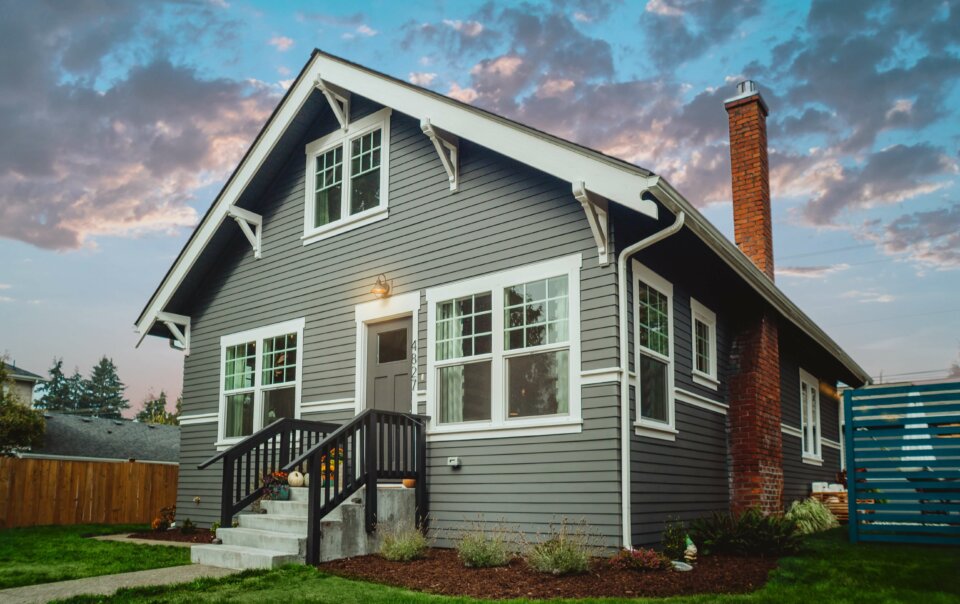
#1 Get that blue sky in your listing photos!
A blue sky on the front exterior shot makes your listing stand out immediately, especially when buyers are scrolling through dozens of thumbnails online. If the weather doesn’t cooperate on shoot day, ask your photographer to swap in a blue sky during editing — most will do this without you even asking. If yours won’t (or can’t), Canva, ChatGPT, or PicMonkey can all handle it yourself.
If you go the ChatGPT route, be specific in your prompt so it doesn’t accidentally “improve” anything else about the house. Something like this works well:
“Edit this exterior home photo to replace the sky with a natural-looking clear blue sky. Keep the exact same aspect ratio and every other element of the image completely unchanged — the house, landscaping, driveway, and lighting on the home itself should look identical to the original. Only the sky should change.”
Always review the result closely before using it — AI edits can occasionally shift small details you didn’t ask for, so double-check nothing else moved.
#2 Add photos of the neighborhood
Today’s buyers care about the neighborhood almost as much as the home itself, so give them a taste of it. A community park or pool, a local festival, a favorite coffee shop, even a dog park — these photos help buyers picture their actual life there, not just the square footage.
Quick tip: Ask your photographer if they already have neighborhood stock photos from previous shoots in the area. Photographers who work a neighborhood regularly often have gorgeous shots of the park, the entrance sign, or a seasonal festival just sitting in their files, and most are happy to share them at no extra charge.
Another quick tip: Many MLS systems cap you at 30 to 40 photos per listing, so if space is tight, turn your neighborhood shots into a single collage instead of using up five separate slots. See how to make a photo collage (for free).
#3 Don’t sleep on drone, video, and 3D tours
This is genuinely the biggest shift since this article was first written: aerial and video content has gone from a luxury-listing extra to something buyers just expect now, especially for anything with acreage, a great lot, or real architectural character.
- Drone/aerial photos: typically $75 to $350, either as an add-on to your photo session or standalone
- Video walkthroughs: typically $300 to $800 depending on length and production quality
- 3D tours (Matterport and similar): typically $200 to $500, scaling with square footage
You don’t need all three on every listing — match the investment to the price point. A $300,000 starter home probably doesn’t need a cinematic drone reel, but a listing with a great backyard or a lake view absolutely benefits from one.
#4 Consider AI virtual staging for empty or dated rooms
An empty room photographs like, well, an empty room — and a dated one photographs like a time capsule. Traditional physical staging works great but isn’t cheap or fast to arrange. AI virtual staging has gotten remarkably good as a middle ground, typically running $40 to $75 per photo to digitally furnish or refresh a room before it ever goes on the MLS. We put several tools to the test in our guide to AI virtual staging software.
#5 Help the homeowners prepare the home for photos
Have you ever looked at listing photos and seen a car in the driveway, trash cans by the garage, wrinkled bedding in an otherwise gorgeous primary suite, or a kitchen counter so cluttered you can’t even tell if it’s granite or quartz under there? Here’s what to share with your sellers before the photographer shows up:
- Replace and match all light bulbs throughout the home. Mixing warm and cool bulbs creates weird color casts in photos that are surprisingly hard to fix afterward.
- Open every curtain and blind, then step outside and check that they’re even. The front exterior shot is the most important photo online, and crooked blinds quietly tank curb appeal even if buyers can’t say exactly why.
- Add small pops of color. A bright teapot on the stove or a couple of new throw pillows does wonders in an otherwise neutral, beige-on-beige home.
- Clear the clutter — personal photos, trash cans, toys, pet beds, food bowls. Less is more here, always.
- Clear every countertop in the kitchen and bathrooms, even the stuff you use daily. It makes rooms read as more spacious than they actually are.
- Take down the refrigerator magnets. Every single one.
- Consider pulling up area rugs if there’s gorgeous hardwood underneath — don’t hide the home’s best assets under a rug, literally.
- Double-check the bedding. A wrinkle in the comforter or a sheet peeking out below it photographs far worse than it looks in person.
- Fluff every pillow. Sagging pillows read as tired and sad on camera; new ones are a cheap upgrade if the old ones have seen better days.
- Clear debris from the deck, yard, driveway, and roof, especially if you’re listing in fall.
- Move the cars and trash cans away from the front of the house before the photographer arrives.
- If you’re home during the shoot, stay out of the way. The photographer is seeing your home for the first time and needs to focus on finding the best angles and light — let them work.
As you can see, there’s a lot that goes into getting truly great listing photos — but it’s worth every bit of the effort, especially since nearly all home buyers now start their search online, often scanning dozens or even hundreds of thumbnail-sized listing photos in a single session. That blue sky and clean, uncluttered shot is what makes yours the one they actually click on.
And here’s a nice side effect: the neighbors notice too. A beautifully photographed, well-marketed listing on the block is a walking advertisement for you — and the next person thinking about selling is very likely to remember whose sign was in the yard when it looked that good.
Frequently Asked Questions
How much should I budget for real estate photography in 2026?
Plan on $200 to $450 for a standard residential shoot, with the national average sitting around $230. Add $75 to $350 for drone photos, $300 to $800 for a video walkthrough, or $200 to $500 for a 3D tour if the listing calls for it.
Is professional photography really worth the cost?
Yes — homes with professional photos sell up to 32% faster and can bring in $3,000 to $11,000 more at closing than listings shot without one. A $230 photo session that helps add even $3,000 to the sale price is one of the best returns you’ll find anywhere in your marketing budget.
Do I need drone photos and video for every listing?
No — match the investment to the property. A modest starter home usually doesn’t need a cinematic drone reel, but a listing with acreage, a great lot, waterfront, or standout architecture genuinely benefits from aerial and video content, since buyers increasingly expect it for anything above the entry-level price point in a given market.
Is AI virtual staging a good substitute for physical staging?
It’s a great middle ground, especially for vacant homes or dated rooms, running roughly $40 to $75 per photo compared to the cost of renting and installing real furniture. It won’t replace physical staging for every situation (buyers touring in person still see the empty room), but it dramatically improves how the listing looks online, which is where most buyers form their first impression anyway.
Helpful Resources
Real Estate Photographer Directory
Home Tour America Photography (Metro Atlanta)
CirclePix Real Estate Photographers (located in many Metro areas around the US)
For more free tools to grow your business, see our full list of 32 free tools every real estate agent should be using.
Editor’s note: This article was created by Kerry Lucasse, Agent/Owner at eXp Realty. Information deemed reliable but is subject to change.
PIN THIS IMAGE TO SAVE AND SHARE THIS POSTS!
Ready to get more from your brokerage? Learn why agents voted eXp Realty Top Place to Work!
Please note: This website contains affiliate links. As an Amazon Associate, we earn from qualifying purchases at no additional cost to you. Learn more.